🔒 Your First Line of Defense in 2025: Identity Security Risky Sign-ins – Part 2🔒
As we step into 2025, it’s clear that the stakes for cybersecurity have never been higher. Businesses can no longer afford to treat security as an afterthought—it must be woven into the fabric of your strategic planning from day one. One of the most critical areas to address immediately is Sign-In Security. Why? Because protecting your organization’s access points is your first line of defense against breaches and data theft.
Sign-In Security focuses on ensuring that access to your systems is safeguarded by verifying that the right people, using the right credentials, access the right resources at the right time. It’s a vital component of a strong cybersecurity strategy, providing a barrier against breaches often caused by compromised credentials.
With Microsoft Entra ID Identity Protection, you’re not just securing sign-ins—you’re creating a secure foundation for your organization’s data and resources.
Key Sign-In Security Approach
-
Risk-Based Conditional Access: Automatically block risky sign-ins before they occur.
-
Automated Threat Responses: Mitigate sign-in threats with instant, proactive measures.
-
Sign-In Risk Detection: Identify and remediate risky or unusual sign-ins.
-
MFA Integration: Enhance sign-in security with seamless Multi-Factor Authentication.
Licensing Required: Microsoft Entra ID P2 or equivalent Microsoft Security and Compliance package.
How to Configure Conditional Access Policies to Secure User Sign-Ins
What is Sign-In Risk? Sign-in risk refers to the likelihood that a sign-in attempt is potentially compromised. This assessment is based on signals such as:
Anonymous IP Usage
-
Sign-ins from Tor networks or proxies obscure user identity and indicate potential fraud.
-
Mitigation: Block anonymous IPs using Conditional Access policies.
Impossible Travel
-
Logins from geographically distant locations within a short timeframe suggest compromise.
-
Mitigation: Use real-time risk evaluation to block suspicious sign-ins.
Credential Stuffing Attempts
-
Attackers try large volumes of stolen credentials to gain unauthorized access.
-
Mitigation: Enable rate-limiting, monitor for unusual sign-in attempts, and enforce MFA.
By configuring Conditional Access policies to mitigate sign-in risks, you can proactively secure access and reduce potential breaches.
Follow These Steps to Configure a High-Risk Sign-In Policy:
1️⃣ Open the Azure Portal and navigate to Microsoft Entra ID. 2️⃣ Use Privileged Identity Management (PIM) to activate the Conditional Access Administrator role, ensuring you have the necessary permissions. 3️⃣ Go to Conditional Access and select “+ New Policy.” 4️⃣ Define Policy Assignments: Target specific users, groups, or applications, and define conditions for when the policy should apply. Now, configure Sign-In Risk to “High,” “Medium,” or both, depending on your organization’s security requirements.
💡 Tip 1: Avoid combining User Risk and Sign-In Risk in a single policy to maintain clarity and simplify troubleshooting.
5️⃣ Set Access Controls in the Grant Section: Enable “Grant” and require Authentication Strength—use default or customized methods tailored to your needs. 6️⃣ Configure Session Controls: Set Sign-In Frequency to “Every time” to enforce frequent reauthentication.
💡 Tip 2: Always start in Report-Only Mode to observe the policy’s impact without disrupting workflows.
By implementing these steps, you can effectively secure your organization’s sign-ins and enhance overall identity security.
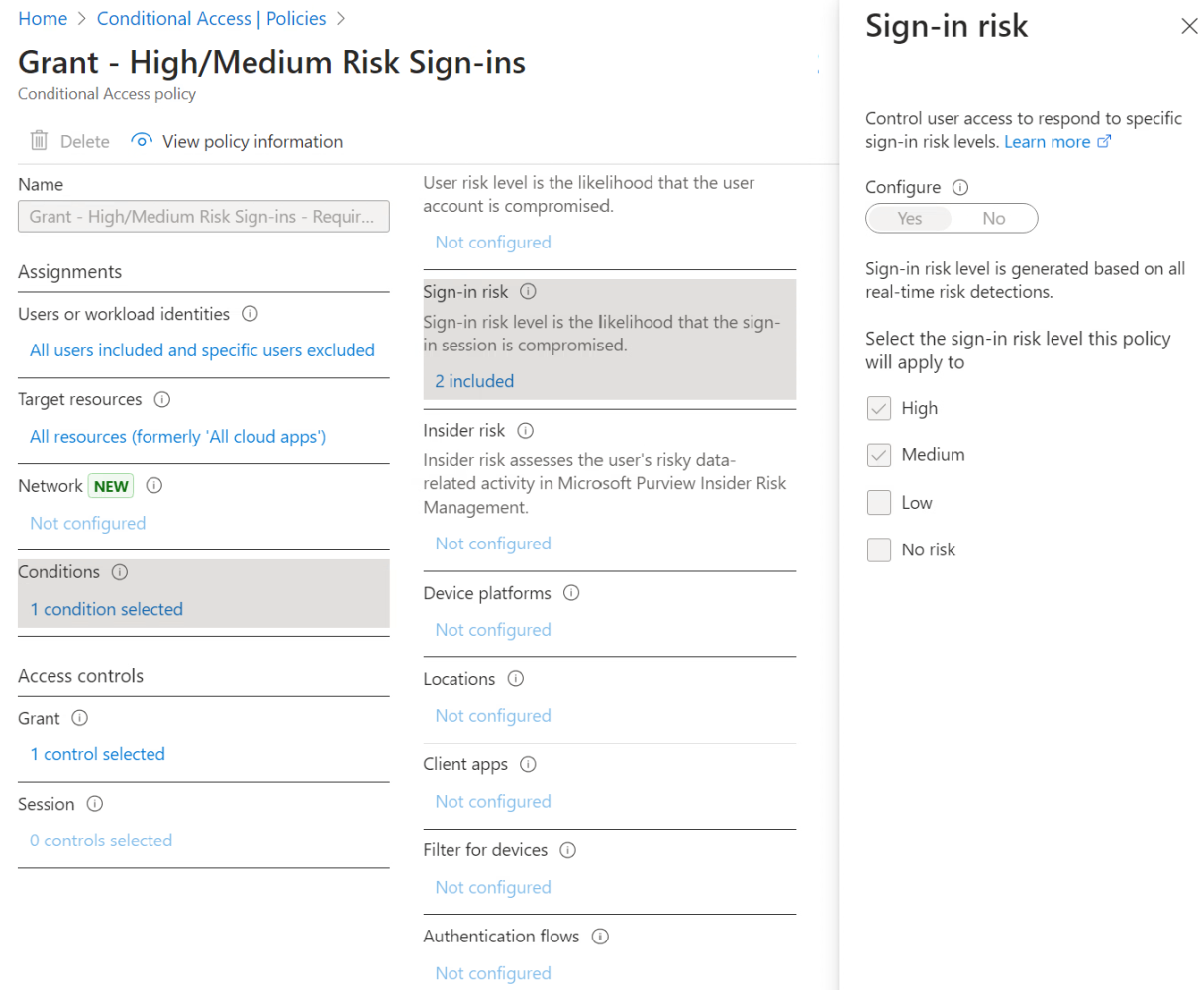
Identity Protection | Risky Sign-ins
Building a strong identity strategy isn’t just about shutting out attackers; it’s about empowering your business to operate smoothly and securely. With Microsoft Entra ID, you’re not just safeguarding your systems—you’re equipping your organization to adapt, innovate, and thrive in today’s fast-paced security landscape. By making security a cornerstone of your growth strategy, you ensure your business is resilient and prepared to face whatever challenges the future may bring.
📩 Contact us or leave a comment to learn how Entra ID can help you secure your business for 2025 and beyond.

References:
-
Investigate Risk in Microsoft Entra ID Protection: This resource provides guidance on how to investigate risky sign-ins and user risk in Microsoft Entra ID Protection, offering insights into risk detection and remediation strategies.
-
Risk-Based User Sign-In Protection in Microsoft Entra ID: This tutorial guides you through enabling policies to protect users by automating responses to suspicious sign-in activities, enhancing overall identity security.
-
Combatting Risky Sign-Ins in Azure Active Directory: This article discusses strategies to identify and mitigate risky sign-ins within Azure Active Directory, emphasizing the importance of monitoring and responding to potential security threats.
Glossary:
-
Azure Portal: A web-based management tool for administering Azure services, including Entra ID.
-
Conditional Access: An automated access control tool in Entra ID based on specific conditions like sign-in risk or device compliance.
-
Conditional Access Administrator Role: A role in Entra ID granting permissions to configure and manage Conditional Access policies.
-
High-Risk Sign-In Policy: A Conditional Access policy aimed at addressing high-risk sign-ins by implementing strict access controls.
-
Microsoft Entra ID: A comprehensive identity and access management service that helps organizations secure their identities and manage access.
-
Microsoft Entra ID P2: An advanced licensing tier offering features like identity protection and risk-based Conditional Access.
-
Multi-Factor Authentication (MFA): A security measure requiring two or more verification factors to confirm identity.
-
Privileged Identity Management (PIM): A Microsoft Entra feature allowing just-in-time role activation to minimize unnecessary access.
-
Report-Only Mode: A Conditional Access feature to monitor the effects of a policy without enforcing it.
-
Risk-Based Conditional Access: A feature evaluating risk signals to dynamically enforce access controls.
-
Sign-In Frequency: A session control determining how often users must reauthenticate.
-
Sign-In Risk: An assessment of the likelihood that a sign-in attempt is compromised.
-
Authentication Strength: Policies defining the required level of authentication security.