When MFA Registration Gets Confusing, Here’s Why
Most MFA registration problems are not really MFA problems.
They are pathing problems.
One user is brand new and needs to register their first method. Another already has MFA, Windows Hello for Business, FIDO2, etc. and just wants to update it. Another lost their phone, security key, got locked out, and now needs recovery. On paper, those scenarios look similar. In real life, they are not even close. And if your support process treats them like the same event, things can get messy – and fast! Listen, Microsoft’s combined registration model supports one registration experience for MFA and SSPR, but the user’s path into that experience remains variable based on state, policy, and context.
That is the part many teams miss.
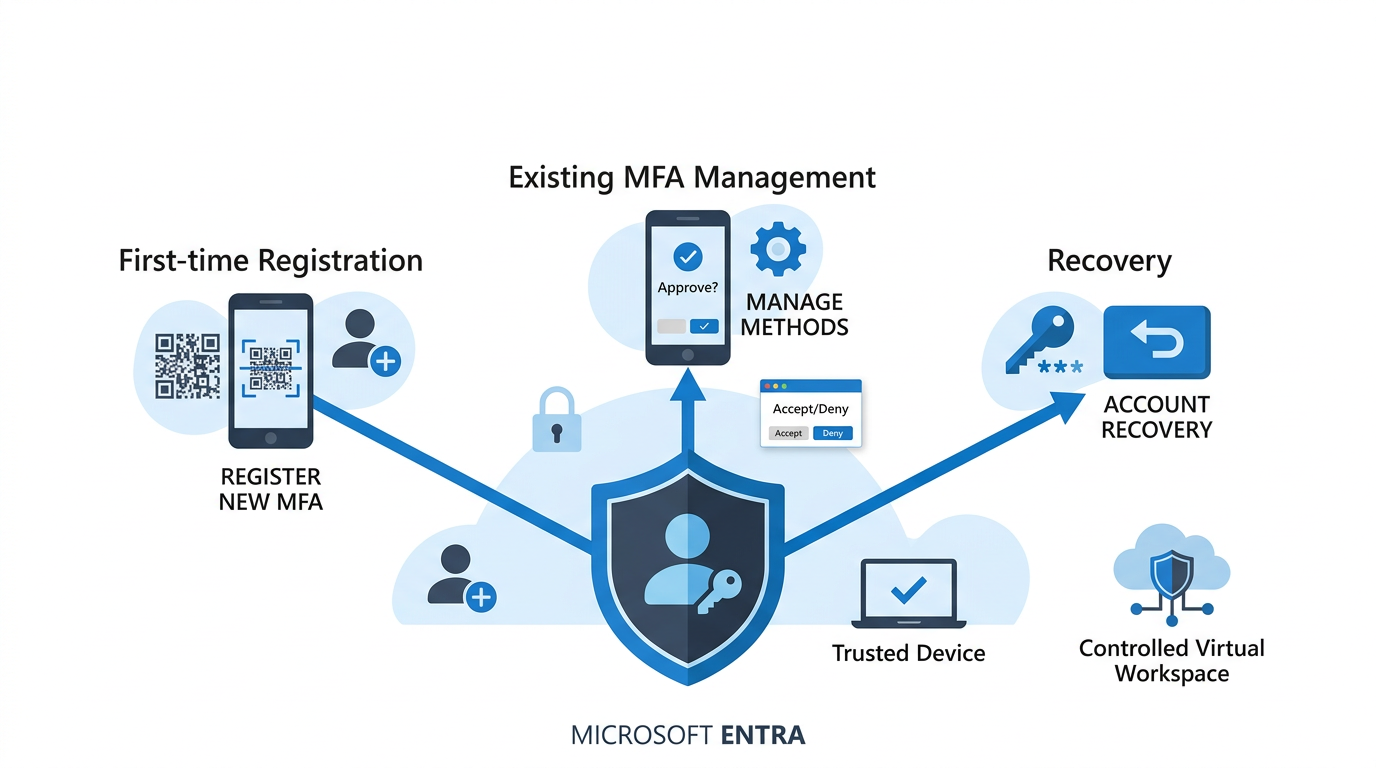
In Microsoft Entra, MFA registration is not one single path. It usually falls into three lanes: first-time setup, management of existing security info, or recovery of lost access. Trusted locations, Conditional Access, Temporary Access Pass, and device requirements do not apply the same way in each lane. Once you separate those paths, the logic starts to make sense. More important, your documentation starts to make sense too.

MFA registration breaks into three distinct user paths
First lane: first-time registration
If the user does not yet have an MFA method registered, the real question is simple: can they reach the first-time registration flow and complete it securely?
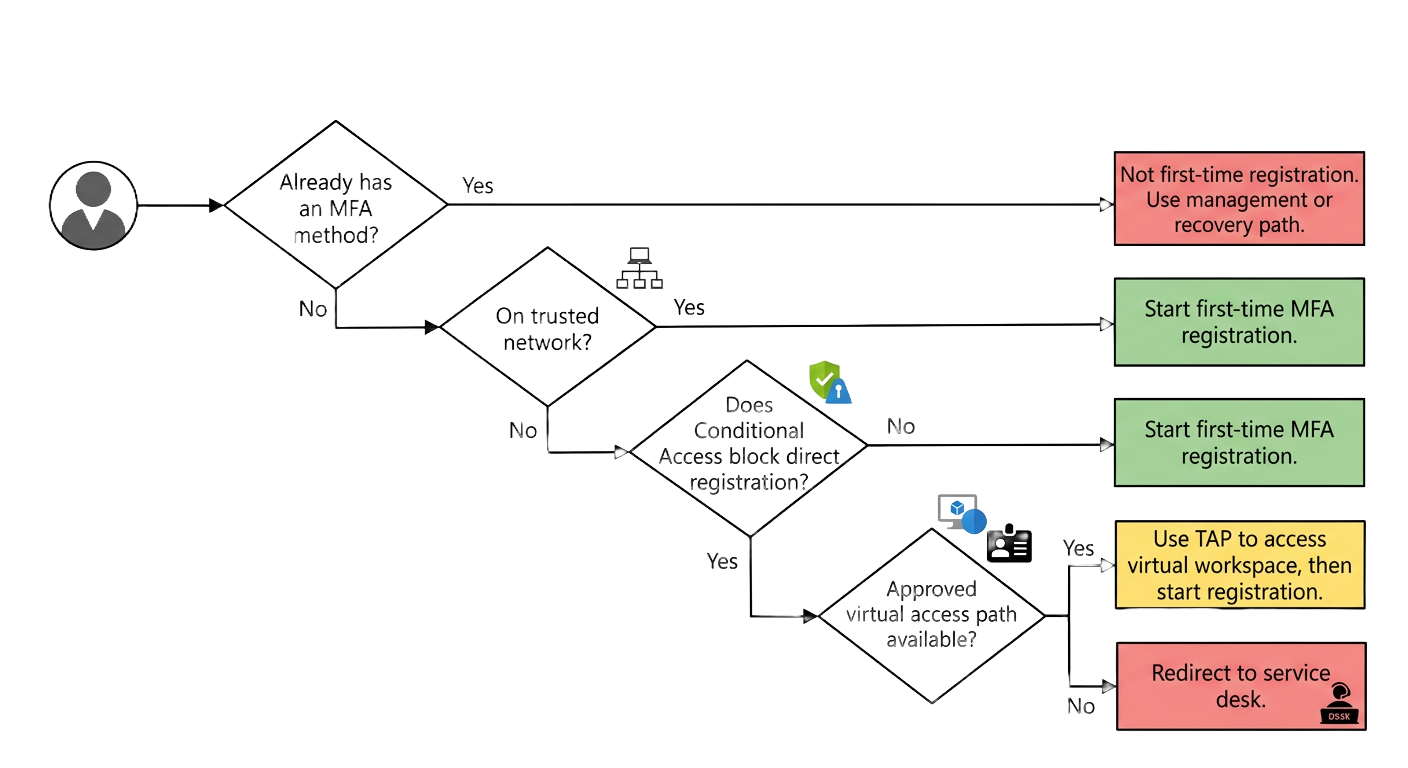
First time registration can depend on network, conditional access and approved entry paths
In some environments, users who are effectively on a trusted network can begin registration without an extra MFA challenge for that step. Microsoft supports protecting the registration action itself with Conditional Access, including the use of trusted locations. If the user is outside that trust boundary, the next question is whether Conditional Access blocks direct access to registration. If it does not, the user may still be able to proceed directly. If it does, the organization may need to provide a Temporary Access Pass, or TAP, which is a time-limited passcode, to help the user reach an approved virtual access path such as a Cloud PC, Citrix session, or another controlled workspace. From there, registration can continue securely. Microsoft supports TAP for onboarding and recovery, and TAP credentials can satisfy Conditional Access requirements for multifactor authentication.
This is where people often get tripped up.
Being able to register MFA does not necessarily mean the user can access everything else.
Those are two different questions.
Second lane: managing existing security info
This is where the conversation changes.
Once a user already has an MFA-capable method registered, they are no longer in a first-time registration scenario. Microsoft’s combined registration experience requires MFA-capable users to strongly authenticate before they can register or manage security info, unless that requirement was already satisfied in the current valid session. Microsoft also documents freshness requirements for some actions, including recent strong authentication for passkey or FIDO2 changes. Put plainly, once the user already has MFA, they usually need MFA again before they can change it.
That catches people off guard all the time.
Someone always asks, “Why are they being challenged again if they already have MFA?”
Let’s look at this in another light – changing ANY security info is factually a sensitive action. Microsoft treats it like one. From a security standpoint, that is a step-up authentication pattern, which lines up with the stronger assurance thinking you see in standards such as NIST SP 800-63B.
Third lane: recovery
This is where support teams earn their keep.
If a user has a registered MFA method but it no longer works, that is not first-time setup and it is not normal self-service management. We’ve just entered recover. Phones get replaced. Authenticator apps get wiped. Tokens disappear. People get locked out at exactly the wrong time. Nothing exposes a weak process faster than a real recovery event.
Microsoft supports TAP for recovery scenarios, and this is where it becomes especially useful. It gives the user a controlled way back into the security info experience so they can establish a working method again. In some environments, support teams also clear broken methods or force re-registration as part of that path. Although those actions may sometimes be necessary, treating them as a default recovery practice can create avoidable friction, weaken process consistency, and point to a less mature support model. The stronger approach is to use targeted recovery methods deliberately and avoid resetting more than the situation actually requires.
TAP helps, but it does not override every other Conditional Access requirement
This is one of the biggest technical misunderstandings I see.
TAP can satisfy an MFA requirement for registration or recovery. It does not override every other Conditional Access requirement in play. Microsoft is clear that multiple Conditional Access policies can apply at the same time, and all applicable policies must be satisfied. So if one policy requires MFA and another requires a compliant device, both still matter.
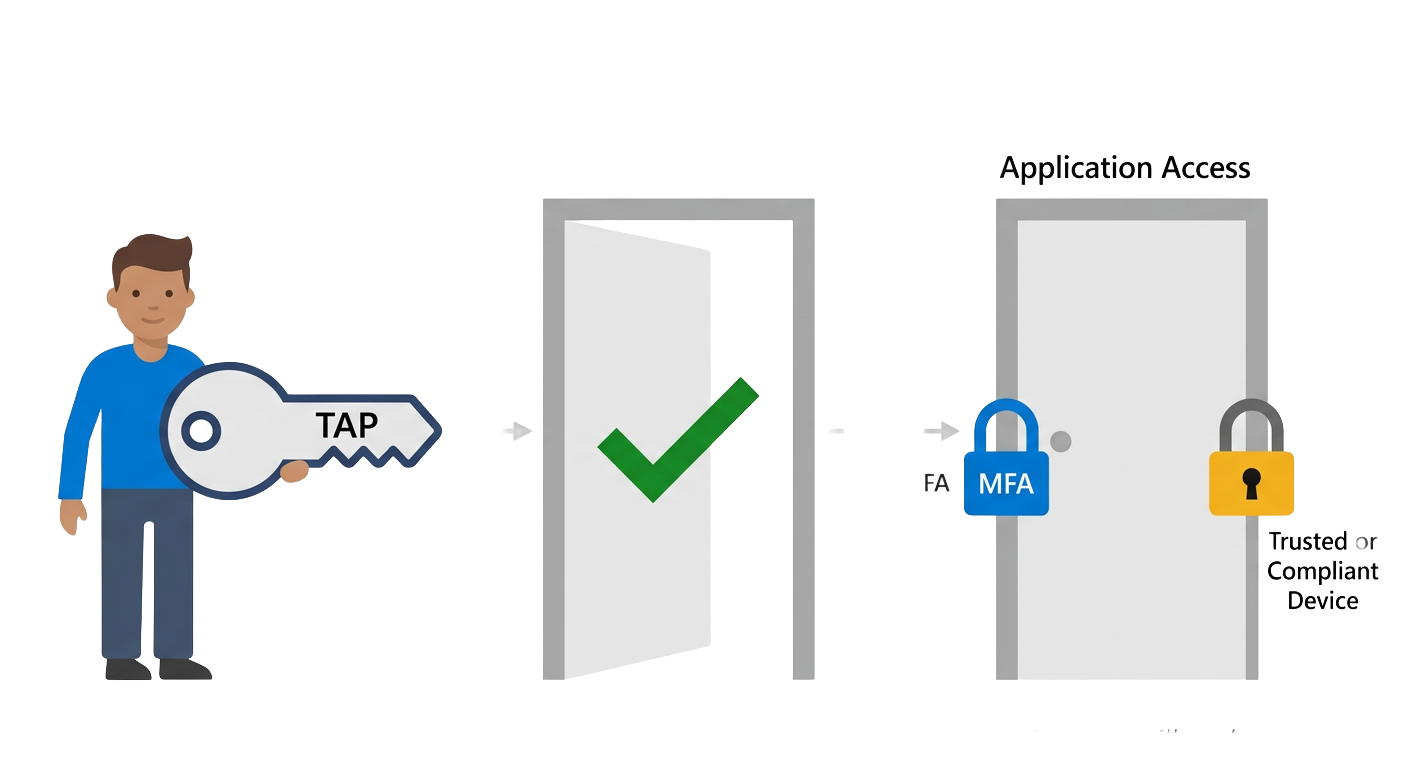
TAP can help with MFA recovery, but it does not bypass separate device controls
That means a user can successfully get through registration or recovery and still be blocked from normal application access because the target application also requires device trust. Device trust here means the device meets the organization’s rules, such as being marked compliant, being hybrid joined, or otherwise approved under policy. That is not a bug.
That is the design doing exactly what it was told to do.
And if you are aiming for defense in depth, that is the right outcome.
Where locked-down environments change the story
This is where things get more interesting.
Some organizations protect access so tightly that a user who is outside the internal network, not using a trusted device, and not already authenticated with MFA cannot directly reach the registration portal in a usable way. In that design, the answer is not to weaken policy. The better answer is to provide a controlled access path first. That might be a virtual workspace, a Windows 365 Cloud PC, Citrix, Workspace ONE, Horizon, or another approved entry point that places the user into a governed session, meaning a session the organization controls and secures under its own access rules.
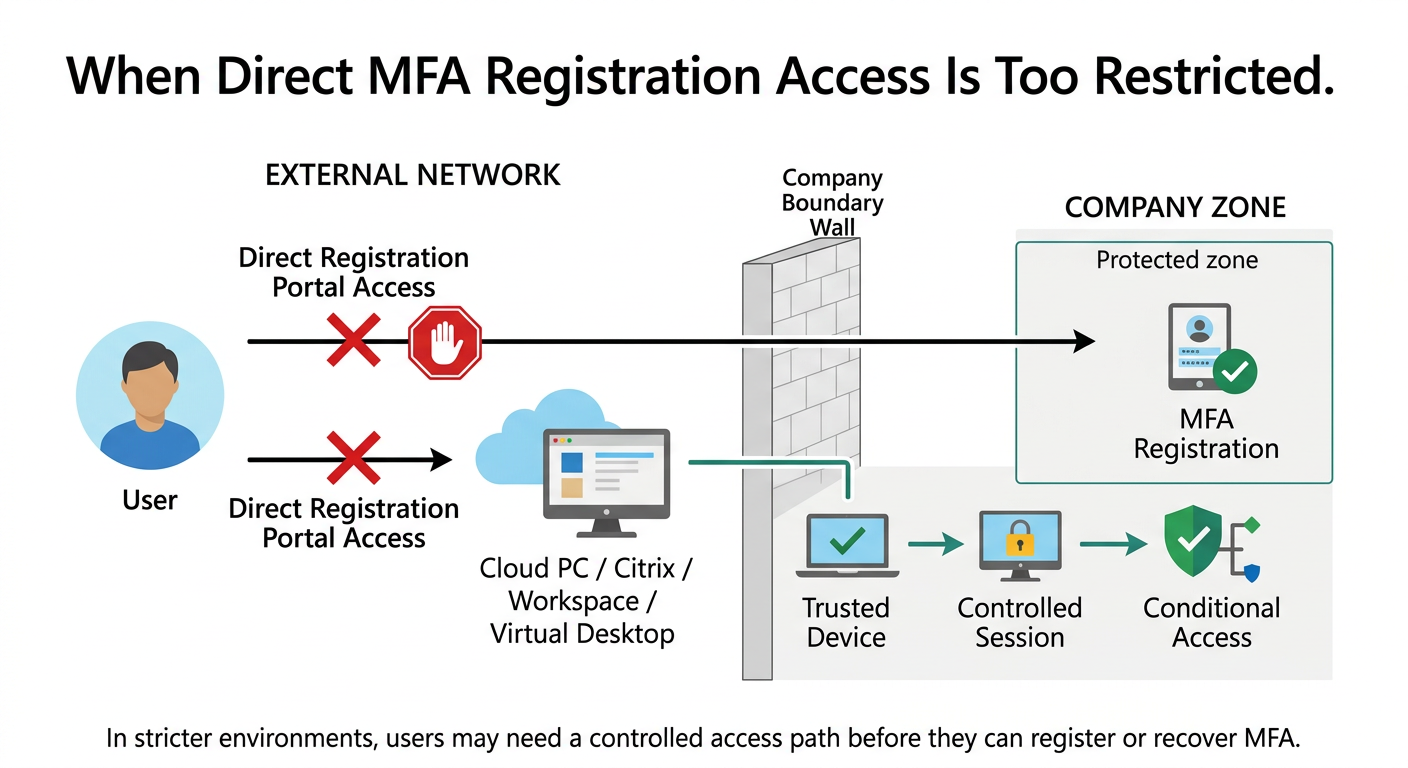
Microsoft supports protecting the registration process itself with Conditional Access, which is what makes this pattern possible.
In other words, the goal is not convenience at any cost.
The goal is secure access without chaos.
This kind of design is not a Microsoft default by itself. It is an architectural choice. Usually a deliberate one. And in more mature environments, it often tracks closely with Zero Trust and least-privilege thinking.
The support lesson most teams learn the hard way
A lot of internal documentation treats MFA registration like a single event.
It is not.
A new user with no registered method is one case. An existing user with a working method is another. An existing user with a broken method is a third. Then add trusted locations, TAP, authentication strengths, device compliance, hybrid join, and virtual access paths. Suddenly the number of valid paths multiplies. Get the idea – it’s not black and white.
If your support guidance does not separate those paths cleanly, your service desk ends up improvising and resorting to unusual solutions, such as clearing all MFA methods. That usually means inconsistent answers, confused users, and more escalations than you should have had in the first place. Who really wants that? And let’s be honest, users can tell very quickly when the team helping them is following a clean workflow versus guessing in real time.
A better way to think about it
Start with one question:
Which lane is this user in?
Is this first-time setup, management of existing security info, or recovery?
Then ask the next questions in order.
-
Does the user already have an MFA method?
-
Is at least one method working?
-
Are they effectively on a trusted network?
-
Is there a TAP path?
-
Are there separate access requirements for device trust?
-
Does the target application require a stronger authentication strength, such as phishing-resistant MFA?
-
Microsoft supports authentication strengths in Conditional Access specifically for that kind of requirement.
Once you answer those questions in sequence, the wondering eyed-confusions begin to lessen. That is where the topic stops feeling abstract and starts becoming operational.
The practical takeaway
The best way to handle this is to document it twice.
-
First, write the knowledge base article so the reasoning is clear.
-
Second, build the decision tree so support staff can quickly identify the user’s state and the next valid path forward.
That is usually the difference between policy that exists on paper and policy that actually works.
Optional callout: when direct registration access is too restricted
In some environments, users outside the corporate network and not already using a trusted device may not be able to reach the MFA registration experience directly in a usable way. When that happens, a controlled access path such as a virtual desktop, Cloud PC, or approved workspace can bridge the gap. TAP can help satisfy the MFA side of the process (providing initial access to this workspace), but it still does not replace separate device or application access requirements. Microsoft explicitly notes that TAP can satisfy Conditional Access requirements for MFA (primary and second factor), while separate access controls can still remain in force. Be certain to know these and other subtle differences.
In other words, it can open the right door, but not every door.
Closing thought
Not all MFA is equal. Microsoft lets organizations define authentication strength in Conditional Access, including stronger combinations and phishing-resistant methods for sensitive resources.
So over time, the real question shifts. It is no longer just “does the user have MFA?” It becomes “does the user have the right MFA for this action, this resource, and this level of risk?”
That is a better question.
And it usually leads to a much better design.

#MicrosoftEntra #ConditionalAccess #IdentitySecurity