The Role Nobody’s Misusing: Least Privileged Access in Conditional Access
When did you last see the full list of people holding high-level roles in your tenant (your organization’s instance of Microsoft 365 & Entra ID), and could you honestly call it least privileged access? And how many on that list used their role this month for anything a smaller role couldn’t have done?
If those questions are already on your mind, they’re the right ones. If you’ve made least privileged access a mandate, you’re right about that too, even though few controls are less popular with a technical team. Why would anyone give up access that works?
Least privileged access gives each person the smallest built-in (a set of admin permissions Microsoft defines) or custom role for the task at hand, on a time-bound assignment. Someone who reviews Conditional Access (security controls for those entering or interacting in your Microsoft 365) gets a role that can only read it. Someone who changes it gets the role built for that change. Roles shouldn’t be permanent, and no unnecessary high-level role sits waiting “in case it’s needed”.
Part of the Conditional Access Foundation series, this piece gives you and your operators the reasons behind it, and the least privileged role for each Conditional Access job.
Why does high-level access become the default?
High-level (privileged) access becomes the typical default because it can be counted on (guaranteed) to “always work.” It’s very easy. A technologist on a deadline uses one of these roles that won’t fail them, and once the work is done, that assignment gets scant attention, unless it was a one-time assignment that’s later removed.
Nobody sets out to hand out too much. Convenience militates against the use and adoption of least privileged access every working day, one assignment at a time.
Let’s break this down – privileged access usually involves three separate internal jobs or functions.
- First, security leadership (your chief security or information security officer) sets the direction and must be able to show auditors and insurers it’s in place.
- Then an identity and access security specialist, usually in IT and often overlooked, scrutinizes who or what holds access to what and turns that direction into access people can work with.
- Lastly, you have your admins and operators who do the work. Their yardstick is whether they can perform their function. Holding too much rarely bothers them, and they’re not at fault unless they have an inkling of the ideal scene for least privileged access. They’re doing different work, and least privileged access belongs typically to the first two.
Microsoft sees the same drift. Its 2024 State of Multicloud Security Risk Report found just 2% of the permissions granted to cloud identities in 2023 were used. In the Microsoft Digital Defense Report 2026, its red team (the people whose job is breaking into Microsoft’s own systems) writes that “A single engineer accumulates standing credentials, broad source access, and a growing set of automation,” and “That mix makes least privilege genuinely difficult to enforce.” So when your team finds it hard, that says more about the problem than about them.
Why take back access nobody’s misusing?
Simply put, just because nobody on your staff is misusing a role doesn’t perforce make it the right size (much like shoes, a bigger size isn’t a better fit). A role that’s bigger than the job needs gives a stolen account (or even an honest mistake) far more to work with. Reduce excess access, and you shrink what can go wrong, no matter who ends up behind or using that privileged account.
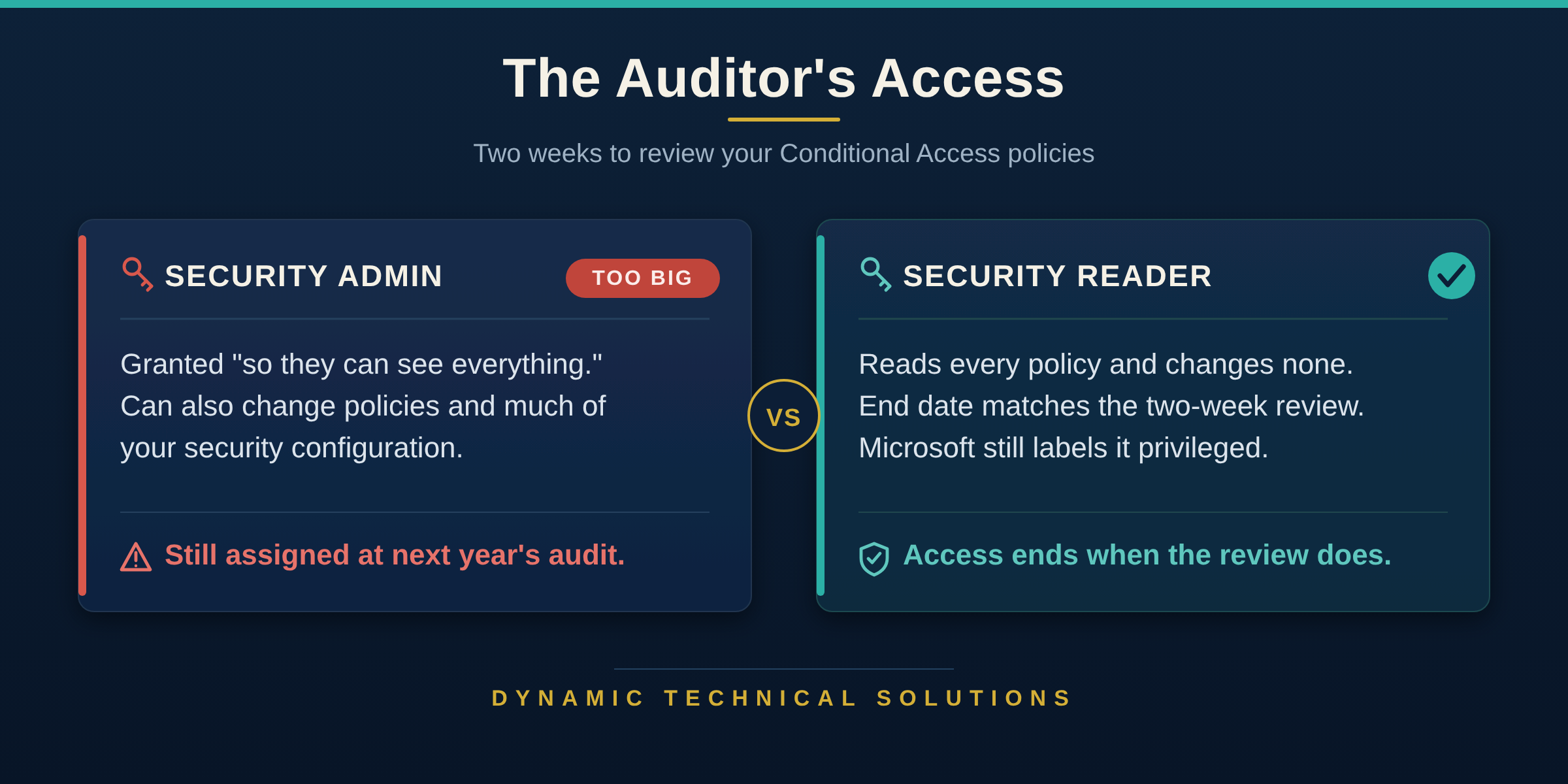
Microsoft’s own security guidance is ultra clear: give administrators “only the access they need to get the job done.” Take, for example, an ordinary request. Your auditors need two weeks to review your Conditional Access policies. The wrong way is handing the reviewer (i.e. your auditor) the highly privileged Security Administrator role so they can “see everything.” This is a role that can also change these same policies and much of your organization security configuration. The correct role to provide is Security Reader, which allows reading of every policy but cannot change any. And yes, Microsoft labels even Security Reader as privileged.
How long a role is held
That’s what I call the “far-too-much” problem. Duration of access, however, is a separate matter entirely, and it’s important to really differentiate the two. A role can be exactly the right size and still be held (or active) far too long. Microsoft’s Digital Defense Report names both, side by side: “Attackers consistently take advantage of unnecessary privileges, persistent access, and weak identity governance.”
Unnecessary privileges is the “far-too-much” problem.
Persistent access is the permanent one.

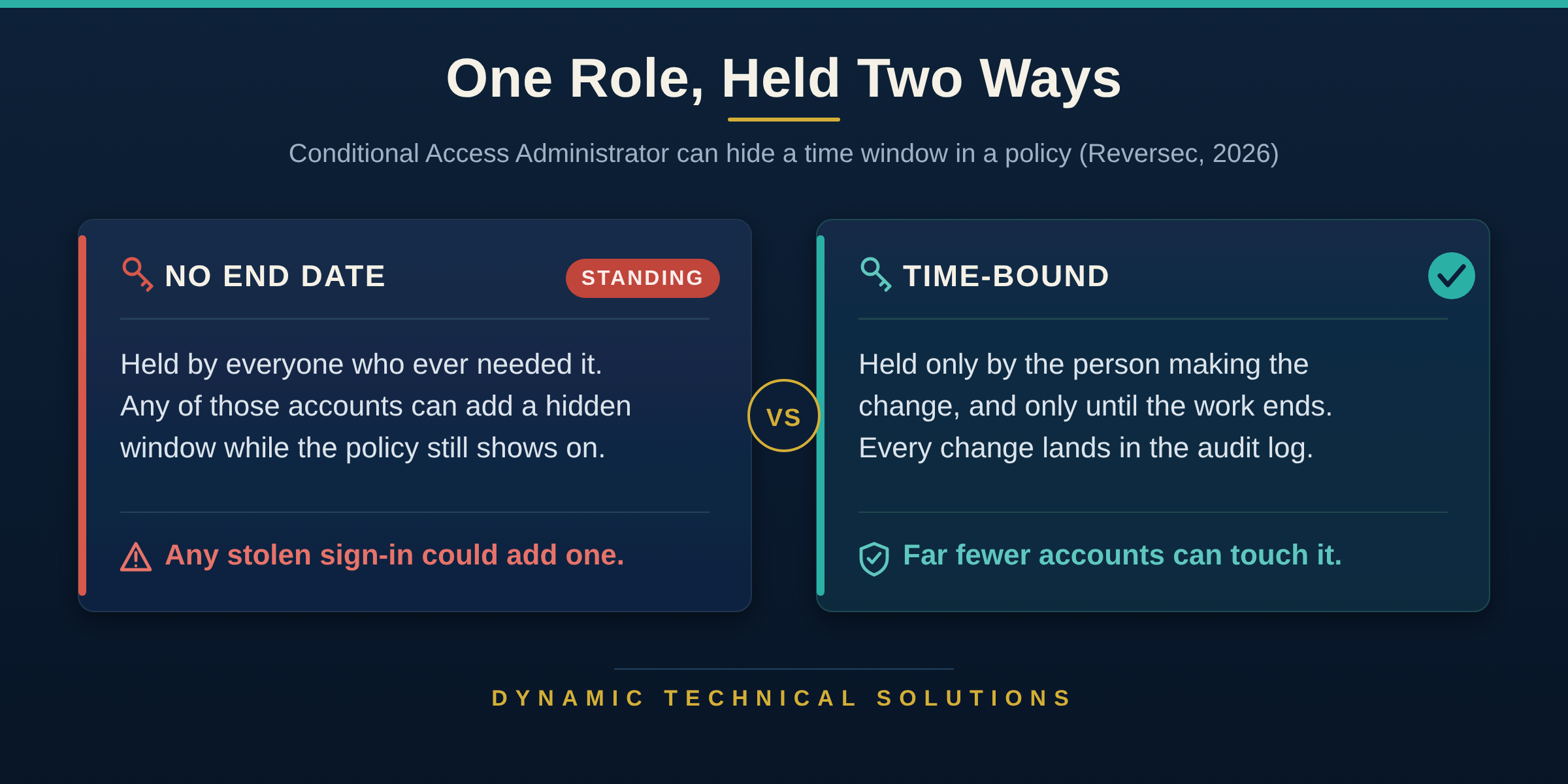
Now consider Conditional Access Administrator, the role Microsoft names as least privileged for creating and changing policies. By definition, it’s already the right size. Yet in April 2026, Reversec researchers showed that anyone holding it could add a hidden time window to a policy (that’s right), one neither the portal nor Microsoft Graph (Microsoft’s programming interface) displays. The policy still showed as On, and a user it should have blocked signed in during the hours they chose. Microsoft called this working as expected, since only Conditional Access Administrators can add it and the change lands in the audit log (the record of who changed what). To be super clear, it was a proof of concept, not an attack seen in the wild.
This is the point that matters most. A right-size role held permanently is available to whoever gets into that account, on any day of the year. How long it’s held IS the control. As I wrote in How to Read a Conditional Access Policy Without Trusting the Name, “If the sentence and the name disagree, believe the sentence.” A policy marked On isn’t proof it’s doing its job.
The same applies to our auditor. Even Security Reader gets an end date that matches the two-week review, so the right-size role never becomes a permanent one.
Which least privileged role does each Conditional Access job need?
Most Conditional Access work needs one of two roles:
Security Reader to read
Conditional Access Administrator to change.
The Conditional Access Foundation standard says it plainly. Each person holds the narrowest role that covers their Conditional Access work, time-bound and never permanent. Nobody uses Global Administrator (i.e. full control of your tenant) or Security Administrator to do it.
Think of the table below as your shoe-size chart: find the job, pick the size that fits, and leave the clown shoes (Global Administrator) in the closet.
Least privileged role for each Conditional Access task
| Operation | Least privileged role |
|---|---|
| What If tool | Security Reader* |
| Reading policies | Security Reader |
| Creating policies | Conditional Access Administrator |
| Updating policies | Conditional Access Administrator |
| Updating authentication methods (including authentication strengths) | Authentication Policy Administrator (methods); Conditional Access Administrator (strengths)** |
| Updating named locations | Conditional Access Administrator |
| Insights and reporting (inside Conditional Access) | Security Reader, plus Log Analytics workspace Contributor (an Azure role) |
| Terms of use | Conditional Access Administrator (Security Reader to read) |
| Audit logs | Reports Reader |
Source: Microsoft Learn, Least privileged roles by task and each feature’s own page, checked 2026-10-18.
* What If (a tool that predicts which policies apply to a sign-in) only reads. Microsoft names no role for it, but its API needs only read permission for Conditional Access, and Security Reader is Microsoft’s least privileged role for reading Conditional Access.
** Microsoft’s Graph reference lists Conditional Access Administrator as least privileged for creating and updating authentication strengths (the sign-in methods a policy accepts as proof). One portal guide says Security Administrator.
Microsoft carves out an exception for emergency access (break-glass) accounts, which keep a permanent Global Administrator assignment so they work when nothing else does. Conditional Access Break-Glass Accounts: Would Yours Still Get You In? explains why. An end date via governance on every other assignment obviates the cleanup nobody gets around to, and how to set those dates is part of Conditional Access Foundation.
Will your operators go along with least privileged access?
They will when they understand what it protects, themselves included. A mandate with no reasons behind it usually gets worked around. Once operators see what the narrow role is for, most ask for it on their own.
Their accounts get reached the same way anyone’s do. Microsoft’s red team says “the foothold still comes from familiar sources, for example, a sprayed credential.” What happens next depends on what’s standing on the account. Walk them through the audit review above: same work, two roles, and only one can rewrite the rules.

It protects them another way, too. When a policy changes and nobody can say why, a short list of holders with end dates, plus the audit log, narrows it to one name and clears the rest of the team.
So how do you get your whole team there, asking for the narrow role without being told? Technology comes from the Greek tekhne, meaning craft or skill, and least privileged access, done well, is a skill of exactly that kind. A team that only knows the rule tends to apply it the week of the audit, and standing access creeps back in between. When they understand why, they catch a standing assignment the day it shows up. That understanding is what Conditional Access Foundation builds in your technologists.
Picture it a few months from now: an engineer about to edit your terms of use asks for Conditional Access Administrator for that day, not Global Administrator, and can tell you why. Today, pull the last three Conditional Access changes from your audit log. Note who made each one and the role they hold, and check it against the table, as a question about the work, not the person. Wherever the role is bigger than the table calls for, start there.
Unpopular opinion: if your engineers have never once complained about least privileged access, you probably don’t have it. Agree or disagree? Tell me why in the comments.

 Written by Shawn May, founder of Dynamic Technical Solutions (DTS). Enterprise identity and security architect with over 30 years of IT experience, specializing in Microsoft identity security, IAM, and technical mentoring.
Frequently asked questions
What is least privileged access in Conditional Access?
Every admin task gets the narrowest built-in role that covers it, assigned for a set time. Reading Conditional Access takes Security Reader, which can see policies but not change them. Creating or changing policies takes Conditional Access Administrator. Nobody uses Global Administrator or Security Administrator for day-to-day Conditional Access tasks, and no assignment is permanent.
Why should admin role assignments be time-bound?
A permanent role works for whoever gets into that account, on any day. Microsoft’s Digital Defense Report 2026 says attackers “consistently take advantage of unnecessary privileges, persistent access, and weak identity governance.” An end date limits how long a stolen account can use the role, and it removes access nobody remembered to take back.
Is Conditional Access Administrator a safe role to hand out?
It’s the least privileged role for changing Conditional Access, but it still decides who gets into your business, and Microsoft labels it privileged. In 2026, Reversec showed its holders could add a hidden time window that lets a policy skip enforcement. Keep the holders few, make every assignment time-bound, and review the audit log.
Who owns least privileged access, security or IT?
Both own a piece of it. Security leadership decides that least privileged access is required and answers for it with auditors and insurers. An access specialist, usually in IT, turns that into specific roles, end dates and reviews. Operators use whatever roles they’re assigned, so the decision has to sit with the first two.
What role do I need to create Conditional Access policies?
Conditional Access Administrator. Microsoft names it the least privileged role for creating and updating Conditional Access policies, including named locations and terms of use. If someone only needs to read policies, use Security Reader. You don’t need Global Administrator or Security Administrator for this work, and every assignment should have an end date.
Glossary
- Least privileged access: The narrowest role for the task, held only until the task is done.
- Conditional Access: Microsoft’s security controls for those entering or interacting with Microsoft 365.
- Tenant: Your organization’s own instance of Microsoft Entra ID, Microsoft’s cloud identity service.
- Built-in role: A set of admin permissions Microsoft defines, which you assign to people.
- Time-bound assignment: A role assignment with an end date, so the access goes away on its own.
- Standing access: A role that stays assigned and ready to use, whether or not anyone needs it right now.
- Global Administrator: The role with full control of the tenant.
- Security Administrator: A broad security role that can change Conditional Access along with much of the tenant’s security configuration.
- Conditional Access Administrator: The built-in role Microsoft names as least privileged for creating and changing Conditional Access, including named locations and terms of use.
- Security Reader: Lets a reviewer see every Conditional Access policy and other security settings without changing any of them.
- Reports Reader: Lets someone view the tenant’s sign-in and audit reports.
- Authentication Policy Administrator: The role that manages which sign-in methods people can use.
- What If: Lets you describe a sign-in (who, from where, to what) and see which Conditional Access policies it would trigger.
- Authentication strength: The set of sign-in methods a policy accepts as proof.
- Named location: A saved set of network addresses or countries that Conditional Access policies can target or leave out.
- Terms of use: A statement people have to agree to in Conditional Access before they get in.
- Insights and reporting: The Conditional Access workbook that shows what your policies did over time, built on sign-in logs kept in a Log Analytics workspace (an Azure data store).
- Audit log: The record of who changed what in the tenant.
- Break-glass account: An emergency access account held in reserve for the day regular admin sign-ins stop working.
- Red team: People whose job is attacking their own organization’s systems to find weaknesses first.
- Access specialist: The person, usually in IT, who scrutinizes which people and apps hold which access, and keeps it narrow and consistent.
- Microsoft Graph: Microsoft’s programming interface for working with the tenant.
- Technologist: The person who designs, builds, changes and maintains your technology.
Our Editorial Process
Each article is based on real-world cybersecurity experience and reviewed for technical accuracy before publication.
Some links may be affiliate links. We may receive compensation at no additional cost to you if you purchase through them. We only recommend products and services we have used or evaluated.
This content is for general educational purposes and does not constitute cybersecurity, legal, or compliance advice. For information about how we collect and protect personal information, review our Privacy Policy.