Blocking USB Storage Does Not Block USB Security Keys
Here is something worth sitting with for a moment.
You have two devices that plug into the same USB port. One is a thumb drive, a potential data leak. The other is a security key, arguably the strongest login credential you have.
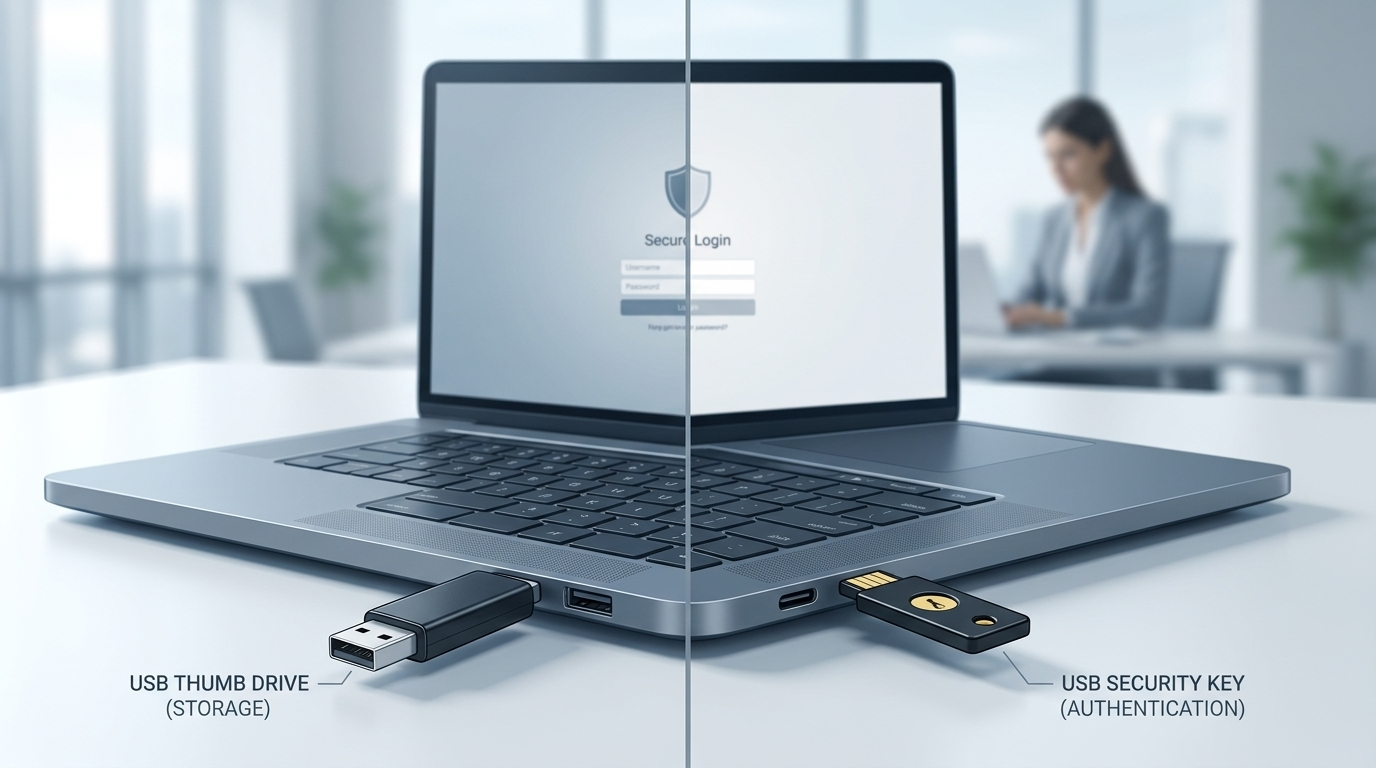
A single policy can affect both. Just not in the way you might think.
The Assumption That Feels Airtight
This is the classic mix-up with USB restrictions in a Microsoft environment.
The logic feels solid: block the port, block the risk. But that assumption hinges on one small technical detail that, once you see it, changes everything.
What Windows Actually Sees
When you plug in a thumb drive, Windows knows exactly what it is.
It registers as a storage device under the USB Mass Storage Class driver. That is precisely what Intune or Group Policy targets when you configure a USB storage block. The policy works exactly as designed for that device class.
A FIDO2 security key is different.
It does not present itself as storage. It communicates over the HID protocol, the same protocol your keyboard and mouse use. To Windows, it looks like an input device. A policy targeting mass storage is completely blind to it, and that is by design. Security keys are not a data movement risk. They are your strongest defense against phishing.
Same port. Same physical act of plugging something in. Two entirely different conversations happening inside Windows, across two different driver stacks. A rule for one does not apply to the other.
Where Entra ID Changes the Picture
It gets more interesting when you bring Entra ID into the picture.
A sign-in attempt passes through several layers: the browser, the Microsoft Authentication Broker, your authentication methods policy, and Conditional Access. These layers do not automatically share intent. Design them together and you get a coherent security model. Configure them independently and each piece can look correct while the full picture has a gap you did not plan for.
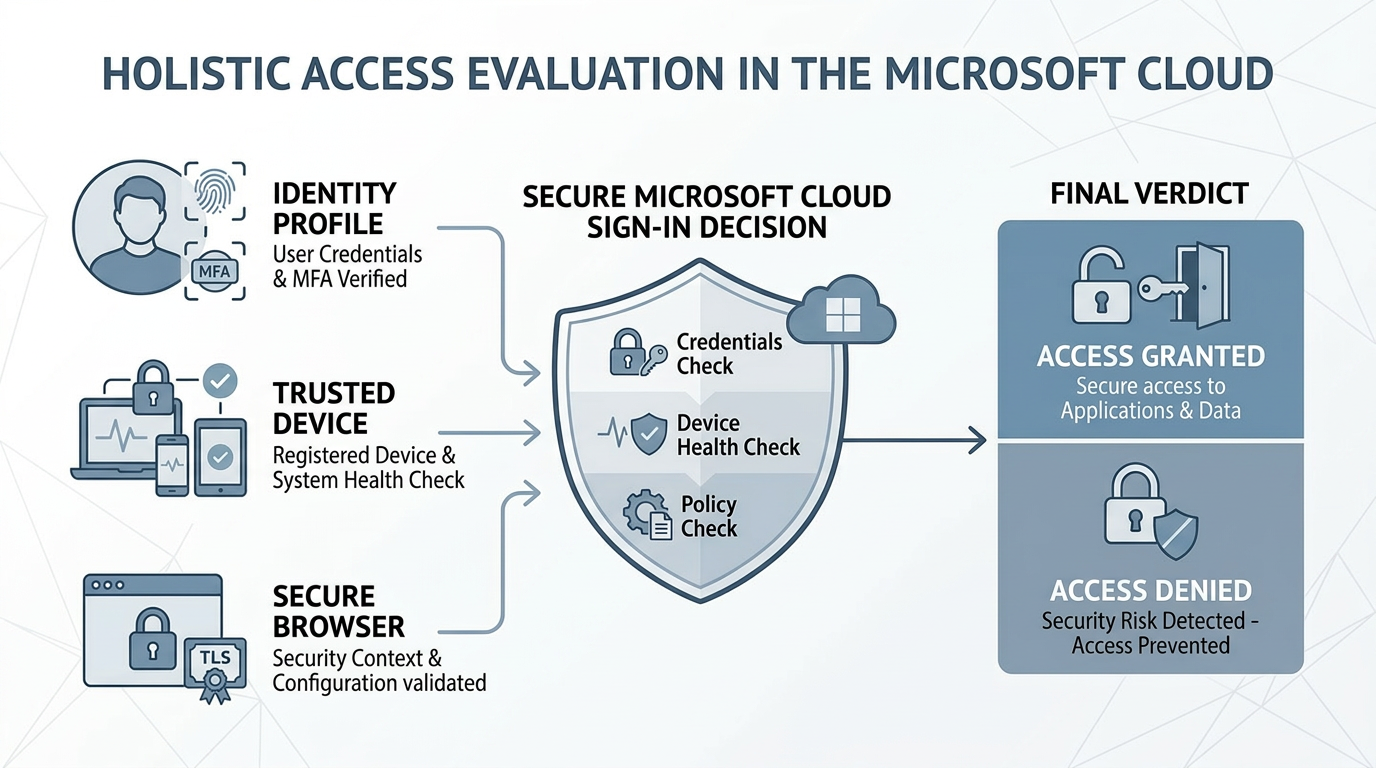
If you have enabled FIDO2 in your tenant and your Conditional Access policy requires phishing-resistant MFA, it will correctly route sign-in through that security key. The USB storage block has nothing to do with that flow and was never meant to. They are separate tools doing separate jobs.
The same logic runs in reverse. If hardware security keys are your primary authentication method, your endpoint policy needs to account for HID device behavior. A well-designed USB restriction can block storage-based risk while leaving legitimate authentication devices fully functional. Those two goals do not conflict. They just require deliberate design.
The Twist
And here is the real catch.
The policy you think is closing a security gap might be completely invisible to your strongest authentication method. And the policy meant to tighten endpoint security could accidentally break it. Not because either tool is flawed, but because they were never built to talk to each other automatically.

What Actually Goes Wrong
This is not a theoretical concern. There are two concrete scenarios worth understanding.
The first is an unintended authentication path. If FIDO2 is enabled in your tenant without a Conditional Access authentication strength policy governing how and where it can be used, a user with a registered security key can authenticate from an endpoint your team never intended to support that flow. The USB storage block created confidence that USB-based risk was managed. The authentication path was open the entire time. Nobody knew because the validation test never included a security key.
The second is breaking your strongest control at the worst moment. An organization rolls out phishing-resistant MFA as a Conditional Access requirement. An endpoint USB restriction that was not carefully scoped catches HID devices. Every user with a registered FIDO2 key can no longer satisfy the authentication strength requirement. They get blocked from the resource. The control designed to raise the security bar just locked out the users who adopted the strongest available credential.
Neither scenario requires anything to malfunction. Every tool behaves exactly as designed. The exposure lives entirely in the assumption that separate control planes are aligned when nobody has verified that they are.
The Questions Worth Asking
The questions worth asking are simple.
What is your USB restriction actually blocking? Storage, HID, or both, and is that intentional?
How does your FIDO2 configuration line up with your Conditional Access authentication strength requirements? Are those two things even in the same conversation?
Have you tested the actual sign-in experience in the browsers your users work in every day? Behavior across Edge, Chrome, and others can be surprisingly different.
Design, Not Assumption
Getting clarity on these points is not about finding problems.
It is about being confident that your environment is doing exactly what you believe it is doing.
In Microsoft identity, that confidence comes from deliberate design. Not from the assumption that two things sharing the same port are covered by the same policy.

A Note on the Broader HID Attack Surface
Several readers with deep technical backgrounds have raised a point worth acknowledging here.
This article focused on the policy distinction between USB mass storage and FIDO2 security keys and how those two control planes operate independently in a Microsoft environment. That is one layer of the conversation.
There is a broader layer worth knowing exists.
Windows extends implicit trust to anything presenting as a HID device, including at pre-logon, because it needs keyboards and mice to function before a user is authenticated. That trust is class-wide. A device presenting as a USB keyboard inherits it automatically, without storage mounting, without triggering device control policy, and without interacting with anything your USB mass storage block is watching.
That input channel can execute commands in the context of the logged-in identity. What it can reach depends on the environment. This is the threat class that BadUSB and similar attack tools exploit. It exists completely outside the policy discussion in this article.
The practical implication is straightforward.
USB storage blocked and physical attack surface reduced are not the same claim. They feel identical until someone tests the assumption.
That thread deserves its own dedicated treatment. A follow-up article is in progress.
#CyberSecurity #MicrosoftSecurity #IdentityAndAccessManagement #ZeroTrust